(This project started in 2026.)
This will be a project, likely one that goes on for years, that will be a sister project to my GurenCodes webpage. That will be for my more general projects, which may include occasional jumps back to web development or API design or learning assembly or something, but this page will be for my C++ projects. On almost every day, I will have a folder on GitHub showing the work I've been doing. Follow that at this repository here.
I am going to allow myself to use AI LLMs while learning all this, because, as I'll state below, I have ideas in mind of what I want to do with this language. And I'd like to have something sellable actually made in the next 5 years, rather than spending 10 or 15 years intellectually jerking off, while making slow progress.
My ultimate goal in learning C++ is to do indie game development. I'm proud that I learned full-stack web development pretty thoroughly, building 5 different websites I hosted myself from my Linux server. And I learned HTTP daemon server software, PHP, JavaScript, SQL, etc. But what originally got me into programming was that I had a very introverted childhood, where I spent ages 4 to 18 just playing video games nonstop. I LOVED video games.
That was all I wanted to do. Nobody else I knew in the 90s was anywhere near as obsessed with video games as I was. And that lead me into becoming a collector of them and all this stuff. And I wanted to become a game developer or a game reviewer when I grew up. But then that didn't really happen too much, and now I'm in my 30s. But, I just had a few really cool ideas for indie games in the past couple months. One is like FTL: Faster Than Light. One is like Minecraft combined with Zelda. I'm also going to be making a Snatcher-style visual novel in SDL, which I'll probably cover quite soon, and make a YouTube video about.
And I remember back in 2010 or 2011, I was there at ground zero when the first massive wave of indie games came out. I was there on 4chan in 2009 when people were talking about beta versions of Minecraft. I was there when Super Meat Boy blew up, when World of Goo blew up, when Braid (Braid sucks ass btw) came out and reviewers loved it, I was there when Hotline Miami came out, when VVVVVV came out, when Bastion came out, when Cuphead came out. I caught Cave Story probably in 2008, not long after it came out. I also grew up with a lot of early 2000s Flash games.
It's probably a similar feeling to how people who were 10 in the 70s, 80s, or 90s felt. For me, I was 10 in the 2000s. And some of those Gen X'ers seem to have really been impacted by Pac-Man, and Donkey Kong, and the Atari 2600, and typing in BASIC programs into a Commodore 64 way back then. For me, I was really impacted by my Sega Genesis, N64, Game Boy, the 2000s Flash landscape, my PS2, my Wii, and the Windows indie games around 2010-2014.
That was a really good run. '98 to 2014. Also, in that run, I was obsessed with the Angry Video Game Nerd and Classic Game Room, two YouTube retro gaming shows that heavily heavily covered 80s and 90s games.
After that I stopped playing games for a decade, though, because of college and jobs and things like that.
By the time I was 20, I never figured out programming whatsoever. But, still, I have in general been surely far more OBSESSED with video game history than most people. I have 20,000 games in my LaunchBox emulation setup. I have more Steam games than anyone I know.
When I was 20, though, I was obsessed with Fortune magazine and Forbes magazine, and how the S&P 500 was dominated by tech companies. But I kind of put that on the backburner, because, you know, I was born lower class and everything. But that was a cool era for unicorn startups like Uber.
That was also the age I read Outliers by Malcolm Gladwell, and Deep Work by Cal Newport. Some of what these books brushed over was the early life of Bill Gates, and Donald Knuth, and how they would hole up and code for hours and hours on end.
This was also the era of the media telling us that literally everybody should learn to code. Truckers should learn to code, janitors should learn to code, etc. So I did some light reading on Python, although I figured I was too old to be some amazing programmer. (possibly still true, who knows ;) )
When I was 25, I read this book, Coders by Clive Thompson. It's pop culture trite, a lot of it, you could probably say, about many different software teams. It covered the creation of Snapchat, Instagram, and some other important tech companies. And, for some reason, I was enthralled. I enjoy reading books, but a lot of things don't interest me to read. I never want to read most fiction books, and there's lots of subjects that don't interest me, like geology and the history of a lot of places. But reading about Silicon Valley was awesome to me. Silicon Valley seemed amazing. Like possibly the best place on Earth. Of course, the rent prices in the San Francisco Bay Area is hellish, so I probably wouldn't want to actually live there, but the development of the computer and electronics industries was very fascinating to me.
You know, I haven't thought about this until just now, but I'm kind of like the skinny guy from the movie Ex Machina, that learned programming while he was sick. In 2020 and 2021, age 27, I was sick all the time. I learned JavaScript for whatever reason. But I also read the book Masters of Doom, which was about the creation of Wolfenstein 3D and Doom by id Software (John Carmack and John Romero) in the 90s. That, to this day, is my favorite book. I don't know if Carmack was being caricatured in that book, but they described him as this autistic genius that was obsessed with computers. He would hole up in hotels and do nothing but code. He invented the First Person Shooter genre, was an early proponent of open-sourcing game engines, and was great at pushing computer systems as far as they could go. Commander Keen and the Quake series were also great games he created the engines for.
And Carmack is probably my number 1 hero in programming. I also like some of the indie people who have opened up, like Tommy Refenes and Phil Fish. Or Satoru Iwata, previous CEO of Nintendo, who was apparently a programming genius. Also, Terry Davis is cool, Pixel from Cave Story is cool, the guy that coded Rollercoaster Tycoon in assembly is cool. But Carmack seemed like someone who just gets it. He was in it for the love of the game, and has always wanted to push technology. He has loved computers and code since the 70s. And for some reason I very much get that and want to be that.
And of course, Carmack mostly has written all his programs in assembly, C, and C++. So, naturally, I had to give C and C++ a try myself.
But also, Windows has been my primary operating system since the 90s. I was there since Windows 95. And, Carmack wrote most of his 80s and 90s programs on Apple computers, but whatever, that doesn't factor into my headcanon. Windows at the low-level lets the programmer code in the Win32 API and in DirectX. Which is above the kernel. But you are allowed to code in C and C++ to talk to it, using Win32 and DirectX. Personally, since I have been using Windows almost exclusively for 30 years, it feels like the only legitimate operating system to me. And, so, to me, the only platform an indie developer should initially develop for is Windows. And, so, that is what I want to do.
I only recently found out that making an EXE file for Windows is quite easy, actually. As stated above in the spoiler, I feel like Windows is the most legitimate desktop operating system, and so, to me, knowing how to create a Windows window is a very important step to being a modern programmer.
Really, it's fine if you're a Python developer or a server admin that has never made a C++ EXE file for Windows, but I may just sound a bit arrogant as I put out some mental models I have that are there for my own benefit in putting me on the right track.
You can use some fancy text editors on Windows, similar to Linux, like Vim, Emacs, etc., but I'm just going to stick to Visual Studio. I like VS Code for webdev, by the way, but I have found that it is atrocious for C++ compilation. It compiled and worked on some small programs sometimes for me, but it was a bit of a nightmare. You're better off using Visual Studio, the bigger version, when you decide to get into C++.
When installing, I don't remember exactly what I picked. Probably like C++ development and game development, something like that. It gives you categorical options of packages you want to install, when you first boot up Visual Studio.
I also don't remember if I had to set up the compiler or the repos much, sorry. I may update this paragraph in the future if I have to reinstall in the future and find out.
I do personally install a File Explorer extension, and a Include in Build extension, because I tend to keep lots and lots of little CPP files in one solution, and you can't run them all together or there's issues. So I'll disable them all and then just enable the files I want to put in the compile at any given time.
(A little weird that SDL is right below this, and we just got started? Probably. I'm just in the middle of writing up this page, so it's going to be written out of order a bit for a while.)
Although this isn't too bad, it is my least favorite part of using SDL or OpenGL. Having to figure out the dependencies, and how to attach them to the IDE. Anyways, we're just doing SDL right now. The problem is that it's a library, so the functions and such need to be able to be referenced, otherwise your CPP program makes no sense to the compiler.
By the way, before I show you the linking setup, I should mention that the reason that this directory/repo is called "LazyfooSDL" is because, yes, I'm following the LazyFoo SDL tutorials. This section isn't really about that, but it would be a headache for me to rename everything and hide that. Generally none of Lazyfoo's material will make it into this webpage, I was just myself too lazy to make a new project.
How I use Visual Studio, personally, is I put loads and loads of files into one project and then I just run the one that I want. I'm too lazy to ever switch projects. So I have this extension in Visual Studio called Exclude From Build, that, if I right-click on a file, lets me keep it from compiling. Because, naturally, in C++ in Visual Studio, every file in the folder tries to compile. So with my project folder style, I have to right-click on things to include them or exclude them from the build. And I don't mind that too much. It works for me. Maybe it's weird to other people, but I don't really care. Anyways, here's what this folder looks like:

It currently has a mixture of both like 20 programs that I've made, and all of the LazyFoo SDL tutorials. Kind of a weird format, maybe, but I just don't feel like making a new repo for the website explanation.
So, again, to use SDL, we need to tell Visual Studio what it is, pretty much. So download the VC version of SDL from GitHub, from some link on their site. Probably under Releases. I'm going to be using SDL2 for a long time in this course, by the way, but the choice doesn't really matter. The version of SDL2 I use as of this writing is 2.32.6.
Now put the ZIP you got into your repo you made in Visual Studio. For me, that's "C:\Users\*user*\source\repos\LazyfooSDL". Also, unzip it now. It will have an "include" and a "lib" folder in it.
Now, in the project, right click on your project at the top of the Solution Explorer.

Go to Properties at the bottom of the big right-click menu.
We're not going to be shipping anything for sale for a long, long time, so we can just stay in Debug mode for a long time. And so this is what the popup will look like:

Here are the locations to link from and to.

^ VC++ Directories > Include Directories

^ VC++ Directories > Library Directories

^ Linker > Input > Additional Dependencies
By the way, the above images also show the setups for SDL_image, SDL_ttf, and SDL_mixer. Just use the main SDL stuff if you don't need the extra libraries at any given time. The versions of SDL_image, SDL_ttf, and SDL_mixer I use are the VC versions, like we used for SDL itself.
We also need the DLL file for SDL, and/or SDL_ttf/SDL_image/SDL_mixer, to sit next to the EXE file for our project in repos/<repo>/x64/Debug. It's a necessary part of hooking up SDL. And if you ship, it is highly, highly recommended that when you switch to x64/Release, you put SDL DLLs in there.
If you're using my SDL version, and my setup, look in repos/<repo>/SDL2-2.32.6/lib/x64, and SDL2.dll will be there.
And that's one SDL2.dll file. Again, the reason I'm speaking in plurals is in case you decided to set up SDL_ttf, etc. For that one, for example, with the version I use, you would find SDL2_ttf.dll at repos/<repo>/SDL2_ttf-2.24.0/lib/x64/. And that DLL would also sit in repos/<repo>/x64/Debug.
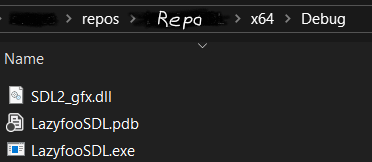
Actually, that's my only DLL that sits next to my EXE right now. Why? Why am I not following my own advice that all the DLLs must sit next to the project's EXE file?
Well, since this is just a Debug setup I'm working on right now, I don't really care about putting DLLs next to the exe in every single project/solution. That would mean doing work more often than I'd like to. So I tell Windows globally where to find the DLL files it'll need for the compile.
That means adding the DLL files to the Windows global PATH manager.
Hit the Windows key, then type 'env', then hit Enter. Click on Environment Variables. Then, under "System variables", click on Path, then click Edit.
Click 'New', and you should be able to add a new filepath. Try to make it look kind of like mine in the red area, but using wherever your DLLs would be sitting in lib. And don't copy my NVIDIA setup or anything, all that stuff is completely unrelated. Also, ignore that I had SDL3 on this computer, we're not using that.

By the way, whether you put the DLL next to the project EXE like a finished build, or you put a reference to it in the Windows PATH for a temporary global solution, the two decisions don't conflict with each other. As long as the compiler finds the DLL file or files it needs in some kind of way, everything is all good.

This is easier than one might think. This is a self-contained program. Only thing is, SDL should be set up with the IDE.
Try compiling it in your IDE (I assume readers of this will be using Visual Studio), and you'll get a window that pops up.
This one's a bit of a bitch to set up, but there's no way I'm going to do the complicated geometrical drawing algorithms you would need to do a circle or a pentagon or something normally with SDL.
This is a library that isn't offically developed by SDL, but has been endorsed by SDL. It is also not currently actively developed. It is useful, though, and I think it's worth setting up, because, I mean, of course we're going to need shapes to make a game, right?
Part of why it's a hassle to set up is you have to find it on obscure parts of the internet right now (I downloaded it from a Sourceforge version with like two all-time thumbs up), and it doesn't even come with the DLL set up.
It also tells you in the README to start by opening the included Visual Studio solution file, which is like a 10-year outdated version of Visual Studio. Also, it's a 32-bit library, which initially won't compile with Visual Studio until you play with the settings and remove this preprocessor directive called USE_MMX in your Configuration Properties.
Yeah. It's pretty rough. But, at least since development on it has absolutely stopped, it will be stable. I also do like what I've seen of this library so far. I'm pretty good at web CSS, and I like that I can make geometry behave like CSS using this library, instead of having to do some 20-line Bresenham algorithm derivation to make a fucking circle.
Anyways, let's do it. Download that Sourceforge version. I've been using v1.0.1. Extract the zip somewhere. Since we'll need to open up a weird Visual Studio solution file they gave us to set something up, I would probably just drop the entire extracted folders into your Visual Studios repos directory ("repos"), so it'll be something like repos/SDL2-gfx-library-test-repo. Then just click on the solution from there. So yes, we'll be leaving the solution/project we've been using so far.
Up top, near "Local Windows Debugger", it might say "Debug" and "Win32". Win32 is a problem, as the only sane thing to do as a Windows developer in the modern age is to make something that is 64-bit. And if this is 32-bit and the main engine is 64-bit, that doesn't work. Click on Win32, go to Configuration Manager, and click on "Active solution platform: Win32". Click on "New", and it will auto-assume to x64. Choose that. It will set all your platforms to x64. Now leave these menus.
Right click on the project (SDL2_gfx), not solution, and go to the Properties. If you clicked on the solution by accident, your options will be visibly pretty limited. Make sure to be on SDL2_gfx Property Pages where you can get to C/C++ > General.

Go to Additional Include Directories, and replace what's in the top area with something like what I used, which is this: C:\Users\jorda\source\repos\<repo>\SDL2_gfx\include
Also put in an incllude for regular SDL: C:\Users\jorda\source\repos\<repo>\SDL2\include
Save that. Now, it's on you to make sure that a folder like SDL2, and a folder like SDL2_gfx exists inside of this strange repo we're making that had someone else's solution in it. That means copying in the old SDL2 folder we had into here in the Windows directory for it, and actually, it means we're going to create our own SDL2_gfx folder and create our own include folder inside of it.
The "include" folder style is good practice these days in folder structure for a project, but at that time I guess they didn't use it. Anyways, we have 4 header files included in this mess that we need. The ones that end in ".h". Put those in the include folder we are artificially making. So that will look like "<repo>\SDL2_gfx\include\SDL2_rotozoom.h", that sort of thing.
Now go to Linker > General > Additional Library Directories, and put "<repo>\SDL2\lib\x64". Then in Linker > Input > Additional Dependencies, put "SDL2.lib".
Then, up in C/C++ > Preprocessor > Preprocessor Definitions, get rid of USE_MMX, then save.
Anyways, it's something like that. You may have to fiddle around with this stupid SLN environment a little bit to get it to work. After you've left the properties, if it asks you at any point to retarget solution, right click on your solution at the top of the Solution Explorer, and that is an option.
Anyways, what I'm hoping happens is, if you click Run Local Windows Debugger at the top of the screen, a folder should show up in File Explorer at <repo>\x64\Debug. And we should get in there, among other things, the files SDL2_gfx.dll, and SDL2_gfx.lib.
By the way, after running, you'll surely get like 1000 errors in the compiler from the example projects that we're not going to use. They try to run but won't but it doesn't matter.
Now if that worked out for you, and you got the LIB file and the DLL file, thank your lucky fucking stars, because this 10-year-old solution file is a nightmare to deal with. Now that we have a SDL2_gfx.dll and SDL2_gfx.lib, we can take these and plop them into our main solution.
So go to your main solution, and there I have a setup of "repos/<repo>/include", and "repos/<repo>/SDL2_gfx/lib/x64". Now I put the 4 headers in the include folder, and the SDL2_gfx.dll and SDL2_gfx.lib in "repos/<repo>/SDL2_gfx/lib/x64".
By the way, annoyingly, we were never going to get to be able to use this library to show something visually in the old crappy solution. I never managed to get it to work. If you do, good for you, but I'm not even interested. But so now we have to set up our main solution with this graphics library, using the DLL and LIB files.
This version of this instruction guide I'm giving you is probably a bit confusing, so I'll just show you what everything should look like, according to how my entire main solution/project looks like. Make sure you're in Properties.


The SDL2_gfx library is a bitch to set up, I know. Anyways, hopefully now you can run an example program in the project. If you see a shape on the screen from the following program, it worked.

Time for OpenGL. There is no OpenGL library thing that is just called "OpenGL" that you install. In the current day, you use GLAD and GLFW. Assuming we're using Visual Studio, Grok showed a really fantastic explanation of the installation to me the other day.

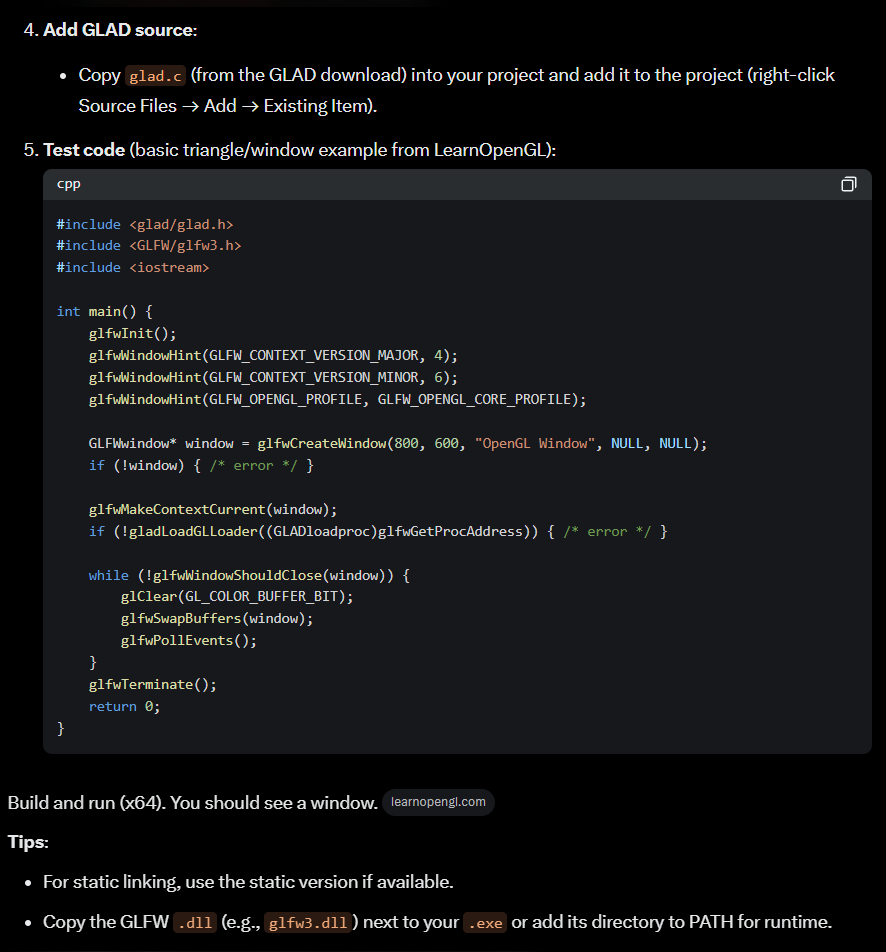
Assuming you missed the part where he says to add glad.c to the Solution Explorer, as I did the first time, here it is.

This whole OpenGL setup is similar to setting up SDL. But I've tried to be fairly deliberate, as actually getting SDL and OpenGL (on their own even) to work can be a really painful experience.
And if they don't work, you obviously can't start using the languages themselves, or do anything.
Anyways...